

Seeing VIN not found after entering a MINI VIN can be frustrating, especially when you’re checking a car before a sale. The good news is that most failed searches come from a typing error, unsupported record, delayed database update, or the wrong search method, not from anything sinister.
Start by checking the number carefully. Then try the MINI VIN decoder again after following the steps below.
Key Takeaways
- Check all 17 VIN characters against more than one vehicle document.
- Remove spaces, punctuation, and characters that may have been misread.
- A failed lookup does not prove that the MINI is fake, stolen, or missing records.
Why Does a MINI VIN Show “Not Found”?
A vin lookup error can happen for several reasons. Some are simple, such as one mistyped character. Others relate to the vehicle’s age, market, or how quickly information reaches the lookup database.
Here are the most common causes to check before you start worrying.
1. One Character Was Entered Incorrectly
A single wrong character can cause the whole search to fail. VIN systems match an exact sequence, so there’s no room for a close-enough spelling.
A zero entered as another number, or a letter typed twice, may lead to an invalid VIN error even when the vehicle itself is perfectly legitimate.
2. Spaces or Symbols Were Included
Some forms accept spaces and dashes. Others don’t.
Copying a VIN from an advertisement, email, or PDF may bring hidden spaces along with it. Enter only the VIN characters and remove dashes, periods, slashes, and other marks.
3. The VIN Has Fewer Than 17 Characters
Modern vehicles generally use a 17-character VIN. Older vehicles may use shorter identification numbers that many online tools cannot process.
This is more common with classic Minis and older imported vehicles. A shorter number isn’t always wrong, but it may require a specialist lookup or manual inspection.
4. The VIN Was Read from a Damaged Label
Dashboard plates and door labels can fade, scratch, bend, or collect dirt. Glare through the windshield can also make one character look like another.
That small blur matters. Check the VIN in daylight, take a clear photo, and compare it with the registration or title before trying again.
5. The Vehicle Was Built for Another Market
A MINI imported from Europe, Asia, or another region may not appear in a database focused mainly on U.S. vehicles.
The VIN may be valid while certain specifications, factory options, or registration records remain unavailable. Data coverage can vary by market, model year, and source.
6. The Record Has Not Reached the Database Yet
A new MINI may already have a VIN while some third-party databases still lack its complete record.
This can happen during production, shipment, dealer intake, or early registration. It helps explain why a new car VIN is not showing up in a database right away.
7. The Lookup Tool Does Not Cover That Vehicle
Not every decoder uses the same sources or supports the same years. One system may identify the vehicle while another returns VIN not in system.
This is especially common with older models, uncommon trims, imported MINIs, and vehicles built during a model-year changeover.
8. The Database Is Temporarily Unavailable
Sometimes, the VIN is fine and the system is having a bad day.
A server issue, maintenance window, or connection problem can produce a failed search. Wait a little, refresh the page, and try again before changing the VIN.
How Can You Fix an Invalid VIN Error?
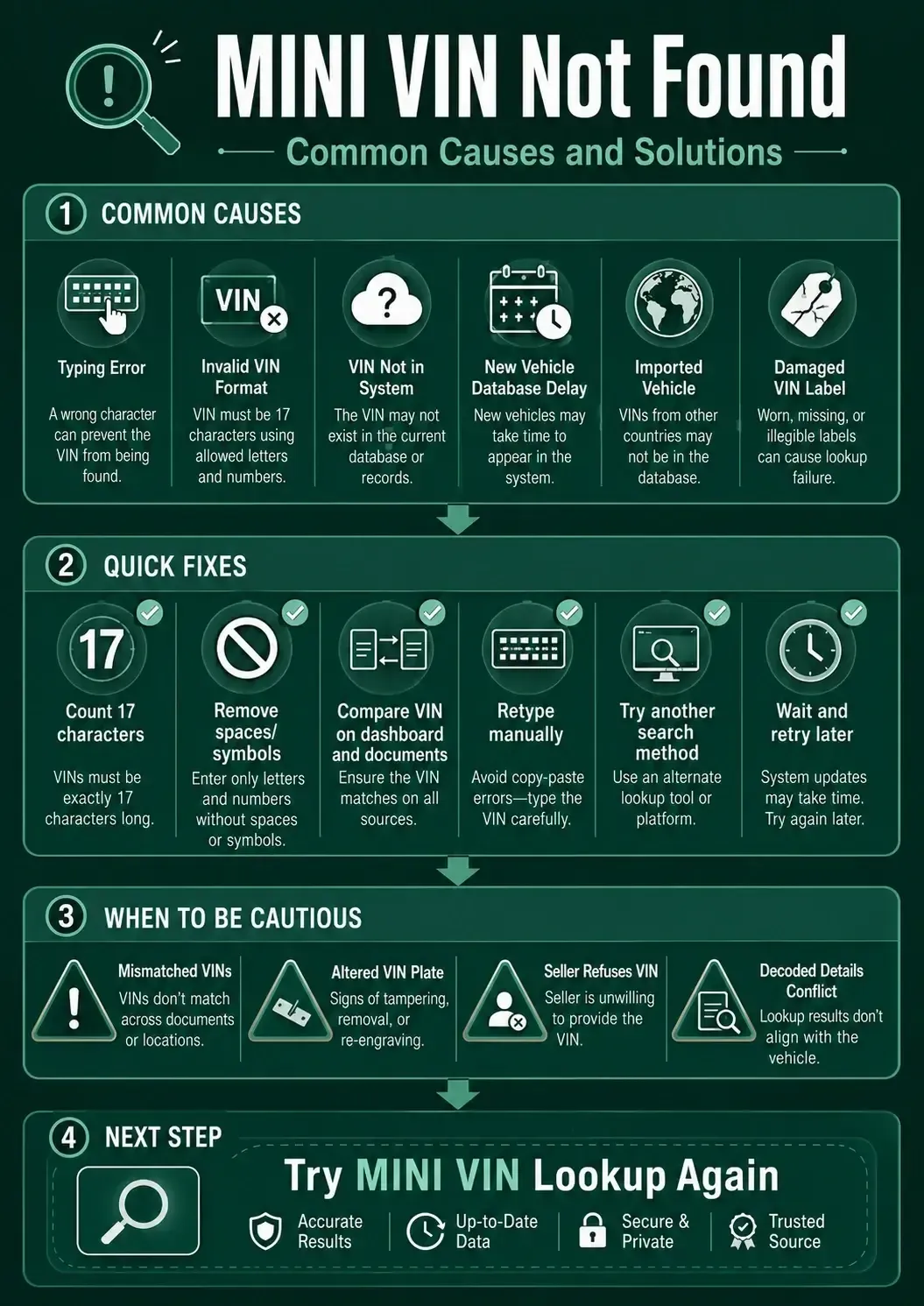
Once you know the likely causes of an invalid VIN, the fix becomes more methodical. Don’t keep typing the same number and hoping for a different result. Work through the VIN one step at a time.
The following checks solve many common VIN decoding errors.
1. Count the Characters
Write the VIN on a clean line and count each character from left to right.
A modern MINI VIN should normally contain 17 characters. If you count 16 or 18, look for a missing character, duplicate entry, or copied space.
2. Compare More Than One Source
Check the dashboard VIN against the driver-side door jamb, registration, title, insurance card, or service paperwork.
The number should match in every location. When two sources disagree, stop and confirm which document belongs to the vehicle before continuing.
3. Check Easily Confused Characters
VINs generally avoid the letters I, O, and Q because they can look like 1, 0, and 9.
Still, blurry photos and worn labels cause mix-ups. Pay close attention to zeros, ones, fives, eights, and similar-looking letters.
4. Type the VIN Manually
Copy and paste is convenient, but it can carry spaces or formatting marks into the form.
Try typing each character by hand. It takes a few seconds longer, yet it often fixes a VIN number not working problem caused by hidden characters.
5. Use Capital Letters
Many VIN tools automatically convert lowercase letters, but some forms are less forgiving.
Enter the VIN in capital letters without spaces. This creates a clean, standard format and makes the number easier to compare with your documents.
6. Try a Different Search Method
When available, search by U.S. license plate or year, make, and model.
An alternate search may help identify the MINI even when the direct VIN lookup fails. You can then compare the result with the physical VIN before trying again.
7. Wait and Retry Later
For a newly built or newly registered MINI, the data may simply need more time to appear.
Save the correct VIN, retry later, and avoid changing characters just to force a result. Guessing creates a false match, which is worse than no match.
8. Ask Support to Review the VIN
If you’ve checked every character and still get vin not found, contact the website’s support team.
Include the VIN, model year, country or market, and a screenshot of the error. Avoid sending title documents or personal details unless they are specifically and securely requested.
Why Might a New MINI VIN Not Show Up Yet?
A brand-new car can have a valid VIN and still be absent from a public or commercial database. It sounds contradictory, but it isn’t. A VIN may exist before every system receives the vehicle’s finished build and registration details.
These four stages can create a temporary delay.
Production Has Been Assigned
Manufacturers may assign a VIN while the MINI is still moving through production.
The identity exists, but detailed equipment, destination, and final status may not yet be available in every external system.
The Vehicle Is in Transit
A MINI traveling from the factory to a port, distributor, or dealership may have limited public data.
Shipping and inventory systems don’t always update at the same moment. One source may recognize the VIN while another remains blank.
Dealer Inventory Has Not Synced
The dealer may have the vehicle in stock before third-party tools receive the latest feed.
This is common around new model launches and busy delivery periods. A short delay doesn’t automatically indicate a problem with the car.
Registration Is Not Complete
Some records appear only after title, registration, or first-sale activity begins.
If you’re asking, “Why is my new car VIN not showing up in a database?”, confirm the VIN with the dealer and retry after the paperwork has progressed.
When Should a VIN Lookup Error Make You Cautious?
Most lookup failures are harmless. Still, a used-car buyer or flipper shouldn’t shrug off every mismatch. Certain signs deserve a slower, closer look before money changes hands.
Watch for these four red flags.
⚠️ VINs Differ Across the Vehicle
The dashboard, door jamb, title, and registration should show the same VIN.
A difference may come from a paperwork mistake, but it can also signal swapped parts, incorrect documents, or a more serious identity issue.
⚠️ The VIN Plate Looks Altered
Be careful if the plate appears loose, scratched around the fasteners, covered, repainted, or tampered with.
You don’t need to play detective in the driveway. Pause the deal and have the vehicle checked by the proper authority or a qualified professional.
⚠️ The Seller Avoids Sharing the VIN
A seller may hide a few characters in a public advertisement for privacy or scam prevention. That can be reasonable.
Refusing to provide the full VIN before an inspection or purchase is different. You need it to verify the vehicle and its documents.
⚠️ The Result Conflicts with the Car
If the lookup identifies a different year, body style, engine, or model, don’t assume the decoder is automatically wrong.
Recheck the VIN first. If the lookup works but the details still seem off, read why a MINI VIN decoder may show the wrong trim or model.
What Should You Verify After the VIN Starts Working?
Fixing the search is only the first step. Once the VIN returns a result, make sure the decoded information matches the MINI you are considering.
These checks help turn a successful lookup into something useful.
- 01
Confirm the Year and Model
Compare the decoded year, MINI model, body style, and trim with the advertisement and registration. A Cooper, Cooper S, Clubman, Countryman, and Convertible can share styling cues while carrying different equipment and values.
- 02
Check the Engine and Drivetrain
Review the available engine, transmission, and drive-type information. These details affect parts, fuel use, driving character, and resale appeal. A badge or seller description should not overrule the VIN-based identity without evidence.
- 03
Compare the Factory Configuration
When available, compare the decoded vehicle with its build sheet or window sticker. This can help verify original colors, packages, options, wheels, and pricing. Later modifications may explain why the current car looks different.
- 04
Match the Result to the Listing
Read the seller’s claims again after confirming the VIN. If the advertisement promises equipment the factory documents don’t show, ask whether it was added by a dealer or later owner. Clear answers build confidence; vague ones don’t.
A Failed VIN Search Is a Signal to Check, Not Panic
When a MINI VIN returns not found, start with the simple stuff. Count the characters, compare documents, remove spaces, and check for a mistyped number. Most problems have a plain explanation.
A failed search becomes more important when the VIN differs across the car, the plate looks altered, or the seller won’t provide the number. In those cases, slow down. There will always be another MINI.
Once you’ve confirmed the VIN, try the MINI VIN lookup again and compare the result with the vehicle in front of you.
Frequently Asked Questions
What should I do when a VIN number is not valid?
Count the characters, remove spaces and symbols, compare the VIN with the dashboard and documents, then type it manually. If it still fails, try another search method or contact support.
Can a valid VIN be missing from a database?
Yes. A valid VIN may be absent because the vehicle is new, imported, older, uncommon, or not covered by that particular database.
Why does my VIN work on one site but not another?
Different tools use different databases, update schedules, and coverage rules. One service may have the record while another does not yet support the model, year, or market.
Can a classic Mini have fewer than 17 VIN characters?
Some older vehicles use identification numbers that are shorter than the modern 17-character format. Many online decoders cannot process those older numbers.
Does VIN not found mean the car is stolen?
No. A failed lookup alone does not prove theft, fraud, or an identity problem. Check the physical VIN and paperwork, and investigate any mismatch before buying.