
MINI VIN Decoder For Car Details
Use our MINI VIN decoder to check basic MINI specs, trim, engine, drivetrain, factory details, estimated MSRP, and market value. Enter your VIN for a free preview, then upgrade only if you need deeper vehicle history records through a paid MINI VIN report.

Why Decode a MINI VIN Before You Decide?
MINI vehicles can be difficult to verify from photos or listings alone. Similar models may have different trims, engines, drivetrains, factory packages, and market values. Using a free MINI Cooper VIN decoder helps you confirm the vehicle’s basic identity before you rely on seller details, paperwork, or marketplace descriptions.
Without a VIN check, you may run into problems such as:
⚠️ The listed trim may not match the actual MINI
⚠️ Engine or drivetrain details may be incomplete or incorrect
⚠️ A Cooper, Cooper S, JCW, Clubman, or Countryman may be misidentified
⚠️ The model year may not match the title, registration, or insurance record
⚠️ Factory details may be missing from the vehicle listing
⚠️ Similar MINI listings may be difficult to compare accurately
Information You Can Get from Free MINI VIN Decoder
Our free MINI VIN search gives you a quick preview of available vehicle specifications. It helps you confirm the vehicle first before paying for deeper records.
Depending on the vehicle and available data, the free preview may show:
- Year
- Make
- Model
- Trim
- Body type
- Vehicle type
- Engine description
- Engine size and specs
- Engine configuration
- Transmission style
- Drive type
- Fuel type
- Country of manufacture
- Assembly plant
- Number of doors
- Standard seating
- Exterior dimensions
- Interior dimensions
- Ground clearance
- Suspension
- Braking
- Steering
- Tire pressure and size
- Wheels
- Tank capacity
- Trailering details
- Front airbag information
- Seat belt type
- Emissions
- EPA class
- MSRP
- Estimated market value
Benefits of Using a MINI VIN Decoder
A MINI Cooper VIN decoder gives you a clearer view of the vehicle before you make a decision. It is useful for buyers, sellers, owners, and anyone comparing MINI vehicles.
Verify the Vehicle Quickly
Check the year, model, trim, engine, drivetrain, and body style before relying on a listing or paperwork.
Compare MINI Listings Better
Use decoded specs to compare similar MINI models, especially when trims or packages are not clearly described.
Support Buying Decisions
Review basic vehicle identity first, then decide whether a paid report is needed for deeper history records.
Reduce Specification Confusion
MINI models can have similar names and body styles. VIN decoding helps separate actual specs from assumptions.
How to Decode a MINI VIN in 3 Simple Steps
- 01
Enter the VIN
Type or paste the full 17-character MINI VIN into the decoder. Make sure there are no spaces, missing characters, or typing mistakes.
- 02
Review the Free Preview
Check decoded specifications such as model year, model, trim, engine, body style, drivetrain, fuel type, estimated MSRP, and market value when available.
- 03
Choose the Right Next Step
If the free preview gives you enough information, you can stop there. If basic specs are not enough, select a paid MINI VIN report for deeper vehicle history.
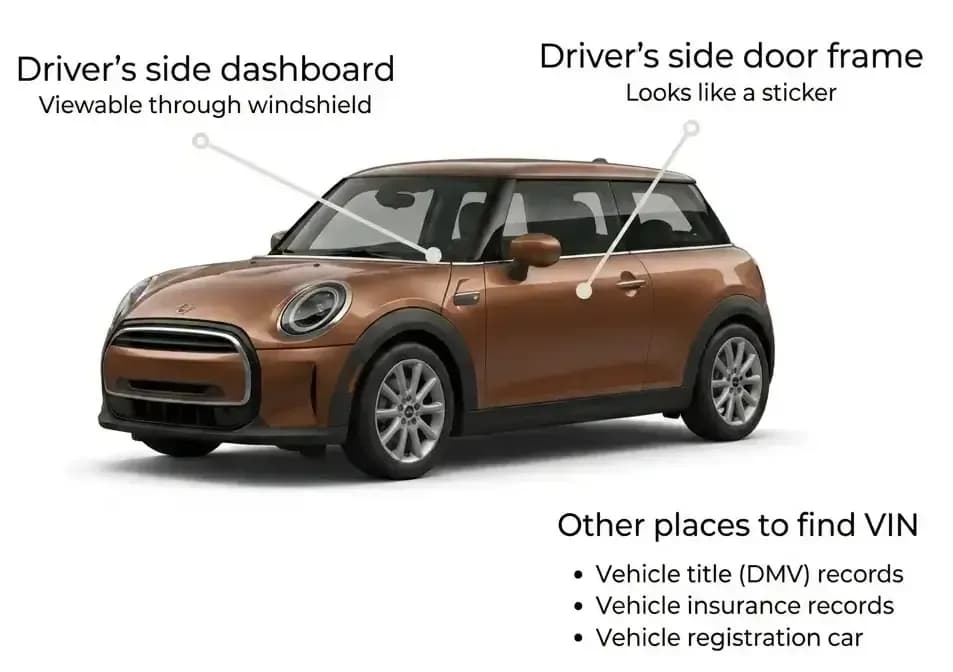
Where to Find the VIN on a MINI Cooper
You can usually find the MINI Cooper VIN number in several places. The easiest locations to check are the dashboard and the driver-side door jamb.
Common MINI VIN locations include:
- Driver-side dashboard near the windshield
- Driver-side door jamb label
- Engine bay or firewall area on some models
- Frame or body locations on some older MINI vehicles
- Vehicle title
- Registration document
- Insurance card or policy
- Sales documents
MINI VIN Number Breakdown: How to Read a VIN
A modern VIN is a 17-character code that identifies a specific vehicle. Each section of the VIN has a different purpose, and the meaning of some characters can vary by manufacturer, model year, body style, market, and production data.
A MINI Cooper VIN number decoder reads the full VIN and turns it into practical vehicle information, so you do not have to interpret every character manually.
A VIN is divided into three major sections:
The first three characters identify the manufacturer and vehicle origin.
Characters 4 through 9 describe vehicle attributes such as model, body style, engine, restraint system, and other configuration details.
Characters 10 through 17 identify the model year, assembly plant, and unique production sequence.
For many MINI vehicles, VINs commonly begin with manufacturer identifiers such as WMW or WMZ, depending on the model and production details.
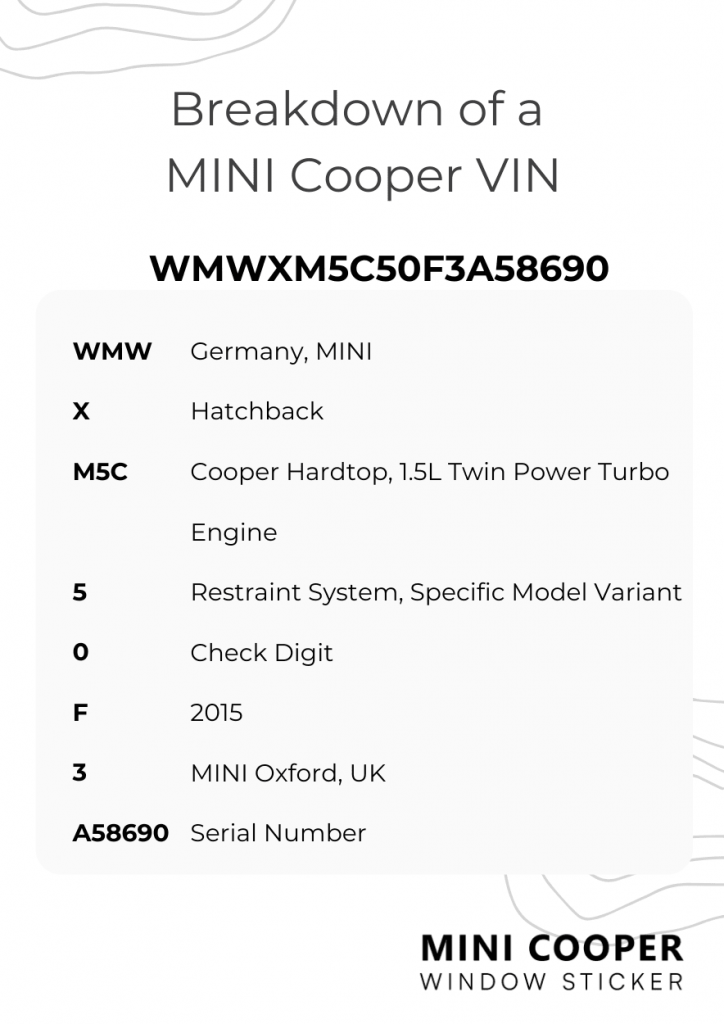
MINI VIN Breakdown Example
Here is a simplified VIN structure example using a MINI-style VIN:
WMWXM5C50F3A58690
A VIN is made up of 17 characters. Each section helps identify the vehicle’s manufacturer, model details, model year, assembly information, and unique production sequence. A MINI Cooper VIN number decoder reads these characters together so users do not have to interpret every position manually.
MINI VIN Breakdown Example
| VIN Position | Example Character | What It Helps Identify |
|---|---|---|
| 1st | W | Country or manufacturer region information |
| 2nd | M | Manufacturer identifier |
| 3rd | W | MINI/BMW Group vehicle identifier |
| 4th–8th | XM5C5 | Vehicle attributes such as model line, body type, engine, and restraint system |
| 9th | 0 | Check digit for VIN validation |
| 10th | F | Model year |
| 11th | 3 | Assembly plant code |
| 12th–17th | A58690 | Production sequence number |
← Scroll horizontally to see more →
This example shows how VIN data is organized. For a complete MINI Cooper VIN breakdown, the decoder reads the full VIN and translates the manufacturer-specific codes into vehicle details such as model, trim, engine, drivetrain, and body style when available.
Characters 1–3: World Manufacturer Identifier
The first three characters are called the World Manufacturer Identifier, or WMI. This section identifies the manufacturer and vehicle origin information.
- W = Country or manufacturer region identifier
- M = Manufacturer identifier
- W = MINI/BMW Group vehicle identifier
For many MINI vehicles, the VIN may begin with WMW or WMZ, depending on model, body style, and production details. This is why a MINI VIN decoder is useful: it reads the full VIN instead of relying on one character alone.
Characters 4–8: Vehicle Descriptor Section
Characters 4 through 8 are part of the Vehicle Descriptor Section, or VDS.
This part of the VIN may help identify vehicle attributes such as:
- Model line
- Body style
- Engine type
- Restraint system
- Series or trim
- Drivetrain
- Vehicle type
- Key configuration details
The exact meaning can vary by MINI model, production year, and market. A MINI Cooper VIN lookup helps translate this section into readable vehicle information.
Character 9: Check Digit
The 9th character is the check digit.
This character helps validate the VIN format. It does not describe the vehicle’s model, trim, engine, drivetrain, body style, or features. Its main purpose is to help detect invalid VINs, typing mistakes, or incorrect VIN patterns.
Character 10: Model Year
The 10th character identifies the model year. VIN year codes repeat over time, so the model year should be interpreted with the full VIN, manufacturer data, and vehicle generation.
A MINI VIN decoder checks the 10th character together with the rest of the VIN to reduce confusion from repeating model year codes.
| Code | Year | Code | Year | Code | Year |
|---|---|---|---|---|---|
| A | 1980 / 2010 | L | 1990 / 2020 | Y | 2000 / 2030 |
| B | 1981 / 2011 | M | 1991 / 2021 | 1 | 2001 |
| C | 1982 / 2012 | N | 1992 / 2022 | 2 | 2002 |
| D | 1983 / 2013 | P | 1993 / 2023 | 3 | 2003 |
| E | 1984 / 2014 | R | 1994 / 2024 | 4 | 2004 |
| F | 1985 / 2015 | S | 1995 / 2025 | 5 | 2005 |
| G | 1986 / 2016 | T | 1996 / 2026 | 6 | 2006 |
| H | 1987 / 2017 | V | 1997 / 2027 | 7 | 2007 |
| J | 1988 / 2018 | W | 1998 / 2028 | 8 | 2008 |
| K | 1989 / 2019 | X | 1999 / 2029 | 9 | 2009 |
Character 11: Assembly Plant
The 11th character identifies the assembly plant code.
This character helps identify where the vehicle was assembled according to manufacturer data. Plant codes can vary by model, model year, and production location, so it is best to decode the full VIN instead of interpreting this character alone.
Characters 12–17: Vehicle Identifier
The final six characters identify the specific vehicle within the production sequence. These characters help separate one MINI from another, even when two vehicles share the same year, model, trim, engine, drivetrain, and body style.
Together, characters 12–17 help identify the exact vehicle, not just the model line.
Top Models You Can Lookup With a MINI Cooper VIN Decoder
Now that you know everything about the VIN, you need to make sure to view the specs and features of any MINI Cooper before making a purchase. Here are some MINI Cooper models you may be interested in:
- Cooper Hardtop
- Electric (SE) Countryman PHEV
- Coupe R58
- Cooper Convertible
- John Cooper Works (JCW) Hatchback
- Cooper S Convertible
- Cooper Clubman
- John Cooper Works (JCW) Convertible
- Mini Aceman J05
- Countryman
- Roadster R59
- Cooper S Hatchback
- Electric (SE) Hardtop
- Paceman R61
Need Past Records ? Get a MINI Vehicle History Report
A free VIN decoder is useful for basic specifications, but it does not show every record behind a used vehicle. If you are seriously buying, selling, financing, or verifying a MINI, a paid report can help you review deeper information when available.
A paid MINI Cooper history report may include:
- Flood Damage
- Mileage
- Odometer Readings
- Sales History
- Auction History
- Accident History
- Title Brand
- Salvage Title
- Hail Damage
- Structural Damage
- Recalls History
- Ownership History
- Usage History
- Ownership Duration
- Lien & Loans
- Warranty Status
Free MINI VIN Decoder vs Paid VIN Report vs Window Sticker
Each tool answers a different question. Start with the free decoder, then choose the next step based on what you need to verify.
| Tool | Best For | What It Helps Show |
|---|---|---|
| Free MINI VIN Decoder | Basic vehicle preview | Year, model, trim, engine, drivetrain, body style, production details, estimated MSRP, and market value when available |
| Paid MINI VIN Report | Used vehicle history | Title records, accident history, mileage records, ownership history, auction data, and other available car history. |
| MINI Window Sticker | Factory equipment verification | Original MSRP, standard features, factory options, packages, colors, fuel economy, warranty details, and other factory data |
← Scroll horizontally to see more →
Need Factory Options and Original MSRP?
A VIN decoder helps identify the MINI. A window sticker helps show how that MINI was originally equipped and priced.
A MINI window sticker may help you check:
- Original MSRP
- Factory-installed options
- Standard features
- Optional packages
- Exterior and interior colors
- Destination charges
- Fuel economy details
- Warranty information
- Safety rating details
Decode Your MINI VIN Today
Start with a free MINI VIN decoder preview to confirm the vehicle’s basic details, including model, trim, engine, drivetrain, and available specifications. If you need more information before buying, selling, or verifying a MINI, you can continue with a full paid VIN report when available.
Frequently Asked Questions
What is a MINI VIN decoder?
A MINI VIN decoder is a tool that reads a vehicle identification number and converts it into readable vehicle details such as model year, model, trim, engine, drivetrain, body style, and production information.
Is this MINI Cooper VIN decoder free?
Yes. You can use the MINI Cooper VIN decoder for a free preview of available vehicle details. If you need deeper history records, factory options, or a window sticker, you can choose a paid report when available.
Where can I find my MINI Cooper VIN number?
You can usually find your MINI Cooper VIN number on the driver-side dashboard, driver-side door jamb, vehicle title, registration document, insurance card, or service records.
What can a MINI Cooper VIN search show?
A MINI Cooper VIN search may show year, make, model, trim, body type, engine information, drivetrain, fuel type, production details, estimated MSRP, and market value when available.
Can I use a MINI Cooper VIN decoder before buying?
Yes. A MINI Cooper VIN decoder helps compare decoded vehicle information with the seller’s listing, title, registration, and available vehicle records before you make a decision.
Can I decode a MINI if I only have the license plate?
In some cases, yes. If the license plate lookup is supported, you can use the plate number to start a vehicle search instead of entering the VIN directly.
Can this decoder show a MINI window sticker?
The decoder helps identify the vehicle first. If a window sticker is available, you can continue to a MINI window sticker report to review original MSRP, factory options, colors, packages, warranty details, and fuel economy information.